


A self-hosted platform for event photography sales, Smart Media operations, optional AI assistance, unlimited media growth, production, delivery, photographer revenue and subscriber access.
 PhotoSales Studio
Selection, pricing, communication, payment, production and photographer settlements often live in separate tools.
One workflow keeps media, customers, photographers, orders, Cloud assets and delivery status connected.
PhotoSales StudioGalleries, originals, derivatives, EXIF, tags, watermark, storage policies and Cloud lifecycle.
Digital, Print and Original formats, pricing, discounts, cart and checkout.
Photographer preparation, final packages, delivery evidence and order completion.
Roles, ownership, revenue, commissions, settlements and payout workflow.
Order customers plus Unlimited Subscriber accounts with protected original downloads.
AI Assistant 2.0, content pages, rich text, multilingual tools, diagnostics, readiness and release QA.
PhotoSales StudioPhotoSales StudioAdmin pages remain thin while reusable services implement authentication, gallery visibility, storage decisions and workflow logic.
The same workflow can resolve media from Local, Hybrid or Full Cloud without redesigning the frontend.
CSRF, role checks, sanitization, signed URLs and bounded QA scans are part of the architecture.
PhotoSales StudioPhotoSales StudioMock AI analysis, Batch AI, AI Queue, Review Queue and Accept & Apply / Reject are validated in the 6.9 generation. Live API integration is API-ready and can be enabled when a production key is configured.
Analyze one photo or queue many photos, review proposed metadata safely, and apply only approved results. The workflow keeps administrators in control instead of blindly overwriting media data.
PhotoSales StudioMaster and presentation files live on the web server. Ideal for smaller installations and simple hosting.
Local-first access with verified Cloud fallback. Useful during migration or mixed infrastructure.
Verified master, thumb, grid, preview and sale outputs live in Cloudflare R2. Permanent local display copies are not required.
PhotoSales Studio
Responsive galleries, lightbox, favorites, selection, formats and pricing — designed for image-first browsing.
Gallery-specific sale formats, print sizes, package discounts, coupons and multiple order/payment channels.
PhotoSales StudioEach photographer sees and prepares their purchased images. Admin/Manager sees the complete order.
Delivery evidence, communication channel, recipient/reference and delivered-photo count stay tied to the order.
PhotoSales Studio| Photographer | Order | Sales | Share | Status |
|---|---|---|---|---|
| Demo Photographer | FS-20260918-104223 | €260 | €78 | Unpaid |
| Studio Team | FS-20260917-082415 | €180 | — | Not required |
| Demo Photographer | FS-20260915-171905 | €420 | €126 | Paid |
PhotoSales StudioAdministrator-created accounts can browse active sale galleries and download protected originals while the subscription is active.

 PhotoSales Studio
The public storefront is designed to stay clear and usable across desktop, tablet and mobile layouts, with consistent search, categories, featured galleries and protected-preview gallery cards.
About, Contact, Privacy, FAQ, Photographer Application and custom pages are managed inside the platform. TinyMCE editing, accordions, SEO metadata and language-aware content keep the site manageable without a second CMS.
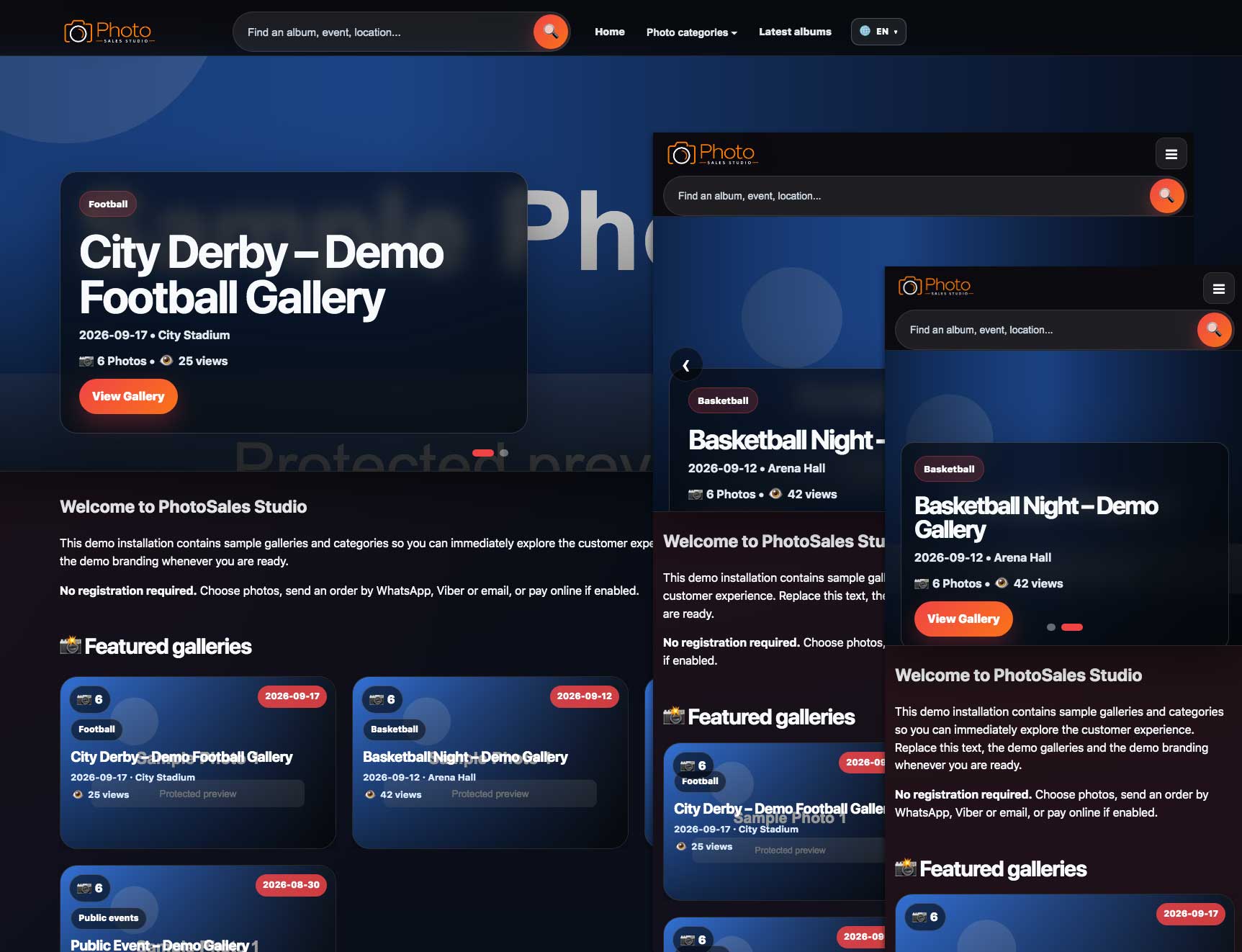
The same storefront adapts to large desktop views and compact mobile screens without losing core navigation, search or gallery visibility.
PhotoSales StudioAdministrator, Manager, Photographer and Subscriber identities with separate workflows.
Role permissions and photographer ownership rules limit what each user can see or change.
CSRF controls, rich-text sanitization and strict handling of executable HTML.
Cloud master objects remain private and are delivered through short-lived authorized links.
PhotoSales StudioRead-only diagnostics, bounded scans and shared health contracts reduce the risk of false warnings in Full Cloud mode.
PhotoSales StudioUpload, categories, galleries, Smart Media Workspace, transformations, watermark, R2 and cleanup.
Cart, checkout, orders, delivery, revenue, payouts, lifecycle and communications.
AI Assistant 2.0, CMS, users, subscribers, localization, appearance, backup, diagnostics, QA and maintenance.
Counts are approximate scope indicators based on the current 6.9 platform line.
PhotoSales StudioThe documentation structure is designed to cover installation, configuration, every major module, role-specific workflows, AI configuration, Cloud storage, QA and maintenance.
Full documentation: https://photosalesstudio.com/documentation/
Recommended FAQ topics: How to configure and use AI · How to add a new language · Smart Media Workspace capabilities · How to enable TinyMCE · How to configure Cloudflare R2.
PhotoSales Studio — from shutter click to customer delivery.
Purchase / licensing inquiries: info@mojsajt.net